An AI operator that runs your space from chat
Message @OhMyDesk_bot on Telegram or open Ask AI in the web app in plain language and it both answers questions about your space and does the work — book or cancel a desk, mark a booking or invoice paid, freeze or reactivate a membership, record an expense, add a lead, let or vacate a private office, draft an invoice — with every change confirmed by a single tap before anything is saved.
Most coworking software hands you a dashboard to click through. OhMyDesk hands you an operator you can just talk to. The AI Operator Autopilot lives inside the @OhMyDesk_bot Telegram chat you already use for notifications: ask it anything about your space, or tell it what to do, in whatever language you type. It reads your live data, never invents a number, and stages every action so nothing changes until you tap Confirm.
See it in action — a real booking in 4 messages
No forms, no menus — just type what you need. The bot finds availability, confirms the details, and logs the booking in seconds.
What you get
- Ask anything — who's in today, how many desks are free this week, revenue this month versus last, members whose plans are ending, leads that have gone cold
- Book a desk from one sentence — or just say 'the next free day' and it finds the first open working day for you
- Cancel a booking or mark one paid, by member name or desk, with a single Confirm tap
- Mark invoices as paid — reconcile invoices right from chat, automatically recording the payment in the ledger and confirming linked bookings with one tap
- Freeze or reactivate dedicated desk plans — pause a membership and bank unused days, or resume a member onto a free desk with one tap
- Log expenses on the go — state the amount, category, and date and save costs directly into your financial ledger with one tap
- Let or vacate a private office — and see your whole space at a glance: desks, meeting rooms, private offices and virtual offices
- Capture a lead the moment someone reaches out, with the right contact channel attached
- Draft an invoice for an existing member, a new member, or a one-off guest — saved as a draft on your Invoices page for you to review and send
- Propose, then Confirm, on every change — nothing is saved until you tap the button, so a stray message can never alter your data
- A short follow-up such as a time or a desk number stays in the same conversation, instead of being read as a new request
- Grounded in your live data and scoped to your space only — it never makes a figure up and never sees another space
- Replies in your language — ask in English, Bulgarian, or whatever you type
- No new app to learn — it's the same @OhMyDesk_bot, now two-way. Available on every plan, including the free trial
More things you can ask
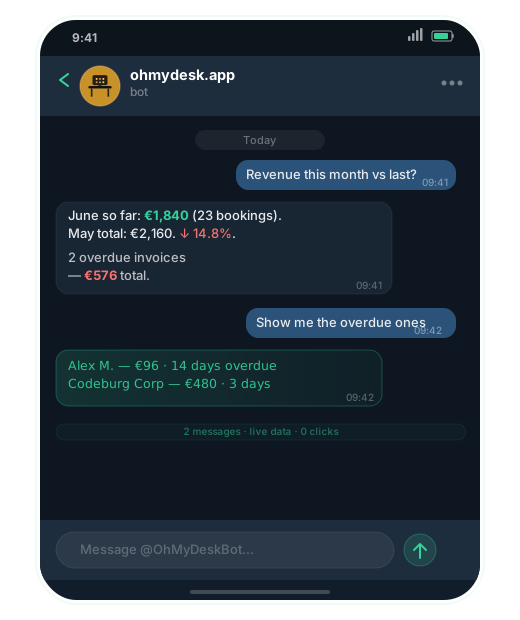
Revenue & invoices at a glance
Ask how this month compares to last, then drill straight into overdue invoices — no dashboard required.
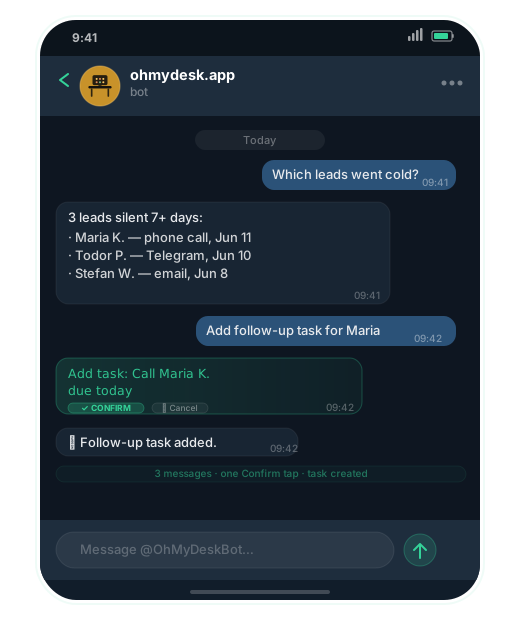
Never let a lead go cold
The bot surfaces leads that have gone silent and lets you add a follow-up task in one Confirm tap.
Frequently asked questions
- Which Telegram bot do I use?
- @OhMyDesk_bot — the same bot that already sends you booking notifications. On every plan it is two-way: you can ask questions and give commands, not just receive alerts.
- Can it book desks in any language?
- Yes. The AI understands plain English, Bulgarian, Russian, and most European languages. Reply to it in whatever language is most natural for you.
- What if I send an ambiguous message by accident?
- Nothing saves until you tap Confirm. Every action is staged and shown to you first — the bot always asks "who should I book it for?" or "which desk?" before committing anything.
- What can it actually do, besides booking?
- It can book, cancel, or mark a desk booking paid; mark invoices as paid; log expenses against your categories; let or vacate a private office; capture a new lead; draft an invoice for an existing member, a new member, or a one-off guest; freeze dedicated-desk memberships; top up meeting room hours; and answer any question about your live data — occupancy, revenue, upcoming checkouts, cold leads, members on expiring plans, and more. Invoices are always saved as a draft — nothing is emailed from chat.
- Is the Autopilot available on all plans?
- Yes. The AI Operator Autopilot is included on every plan, including Pro and the free trial, both in Telegram (@OhMyDesk_bot) and in the in-app Ask AI.
- Does it see data from other spaces?
- No. The Autopilot is scoped strictly to your organisation. It can only read and write data in your workspace — it never has access to other tenants.
Try every feature free for 3 months.
No credit card. Set up your space in under two minutes.
Start Free Trial