Virtual Offices for Coworking Spaces: How to Sell Business Addresses Without Wrecking Your Numbers

A desk, you can sell once. Whoever sits at it on Tuesday is the only person paying you for it on Tuesday.
A business address, you can sell fifty times over — to fifty companies who never set foot in the building.
That asymmetry is why a virtual office is the highest-margin line item a coworking space can carry. You already have the address. You already collect the mail. Renting that out as a standalone product costs you almost nothing per client and scales far past the number of seats you own. For a lot of small spaces, it’s the difference between a room that breaks even and a business that turns a profit.
So why do most operators either not sell virtual offices at all — or sell them and quietly lose track of the money?
Because a virtual office doesn’t fit the tool you run your space on. And the workarounds are worse than they look.
What you’re actually selling
A virtual office isn’t a smaller desk. It’s a different product entirely. A typical plan bundles some mix of:
- A business address the client can put on their website, invoices, and business cards.
- A registered/legal address for company formation, where local law allows it.
- Mail and parcel handling — you receive it, hold it, forward it, or let them collect.
- Optional extras — a few meeting-room hours a month, phone answering, a name on the lobby directory.
The client gets a professional presence without paying for space they don’t need. You get recurring revenue with near-zero marginal cost. The same square metre of lobby that holds one mailbox holds twenty.
This isn’t theoretical. LIMUN Coworking in Novi Sad, Serbia lists its virtual office as the first membership it sells — ahead of hot desks and dedicated desks — aimed at people for whom “everything is online — you don’t even need to come in person.” It runs 3,200 RSD a month (around €27), against 18,000 RSD for a dedicated desk. The desk earns six times as much per client, sure — but there’s only one of it, and it’s full once one person sits down. The address has no such ceiling. For a small space, a healthy stack of virtual offices can quietly become the steadiest line on the books.
The catch is that none of this touches a desk. And that’s exactly the thing your booking tool is built around.
The core problem: an address-only member has nowhere to live
Every coworking tool — spreadsheet or software — is organised around the desk. Rows are desks. Columns are days. A “member” is someone who occupies a cell.
A virtual office member occupies nothing. So you’re forced into one of two bad choices:
-
Cram them onto the desk grid anyway. Now your occupancy lies. You look 90% full when half those “members” are addresses, not bodies. You can’t trust your own utilisation number, your demand signal is junk, and you’ll turn away a real desk lead because the sheet says you’re packed.
-
Keep them in a side list. A second spreadsheet, a folder of contracts, a note in your phone. The revenue is real but it’s invisible — it never shows up in your monthly numbers, so you under-count your own MRR. Renewals get forgotten. Billing is manual. And the day you hand the space to a manager or try to sell it, that list is a liability nobody else can read.
Neither is acceptable once you have more than a handful of virtual clients. And virtual offices, by design, grow well past a handful.
How operators handle it today — and why each falls short
Before building our own answer, I tried (or watched other operators try) every one of these. Here’s the honest scorecard.
A dedicated spreadsheet
The default. Free, flexible, instantly familiar. It also has every failure mode of the desk spreadsheet that breaks at 10 desks: no billing, no renewal reminders, no link to the rest of your space, and revenue that never makes it into a dashboard. You become the human reminder system for every client’s renewal date.
A generic invoicing tool (Xero, Wave, QuickBooks)
These bill beautifully. What they don’t do is know anything about your space. The invoice lives in one world, the client lives in another, and you re-key the link between them by hand. Nothing connects a virtual office to the meeting room that same client booked last week, and nothing stops you billing someone whose term ended in March.
A dedicated mailbox platform (iPostal1, Davinci, PostScan Mail)
Purpose-built for digital-mailbox resellers, and good at scanning and forwarding mail. But they’re built around the mailbox, not your coworking business — they’re a separate monthly subscription, they don’t see your members, meeting rooms, or revenue, and several of them want you on their marketplace and terms. You end up running two businesses in two systems.
A full coworking platform (OfficeRnD, Nexudus, Cobot)
These can model a virtual office properly. They’re also priced and designed for operations running hundreds of desks across multiple sites. For a space with 5–50 desks, you’re paying enterprise money and sitting through onboarding calls to switch on one product line. (If you’re comparing the big ones, I wrote up how they stack up against OhMyDesk.)
Doing nothing
By far the most common. The address is right there, the demand exists — freelancers and small companies ask about it constantly — and the operator never sells it because there’s no clean way to track it. This is the most expensive option of all. It just doesn’t show up as a line item, because you never billed for it.
What a virtual office actually needs from your tooling
Strip away the brand names and the requirements are simple. A virtual office product needs a system that can:
- Hold address-only members somewhere that isn’t the desk grid — so they don’t pollute your occupancy.
- Count their revenue but not their occupancy — the fee is real money; the person is not using a seat. Both facts have to be true at once.
- Bill the company, not the person — usually to a legal name with a tax or VAT number, often annually, sometimes alongside a separate personal invoice for that same human’s desk.
- Track the term and flag the renewal — start date, end date, and a nudge before it lapses, plus an easy “this one runs forever” option for open-ended contracts.
- Let you price each client differently — your standard rate for most, a custom rate for the law firm that negotiated.
Get those five right and a virtual office stops being admin overhead and becomes what it should be: a clean, recurring, high-margin line in your numbers.
How OhMyDesk handles it
I built virtual offices into OhMyDesk against exactly that list, because I needed it at my own space.
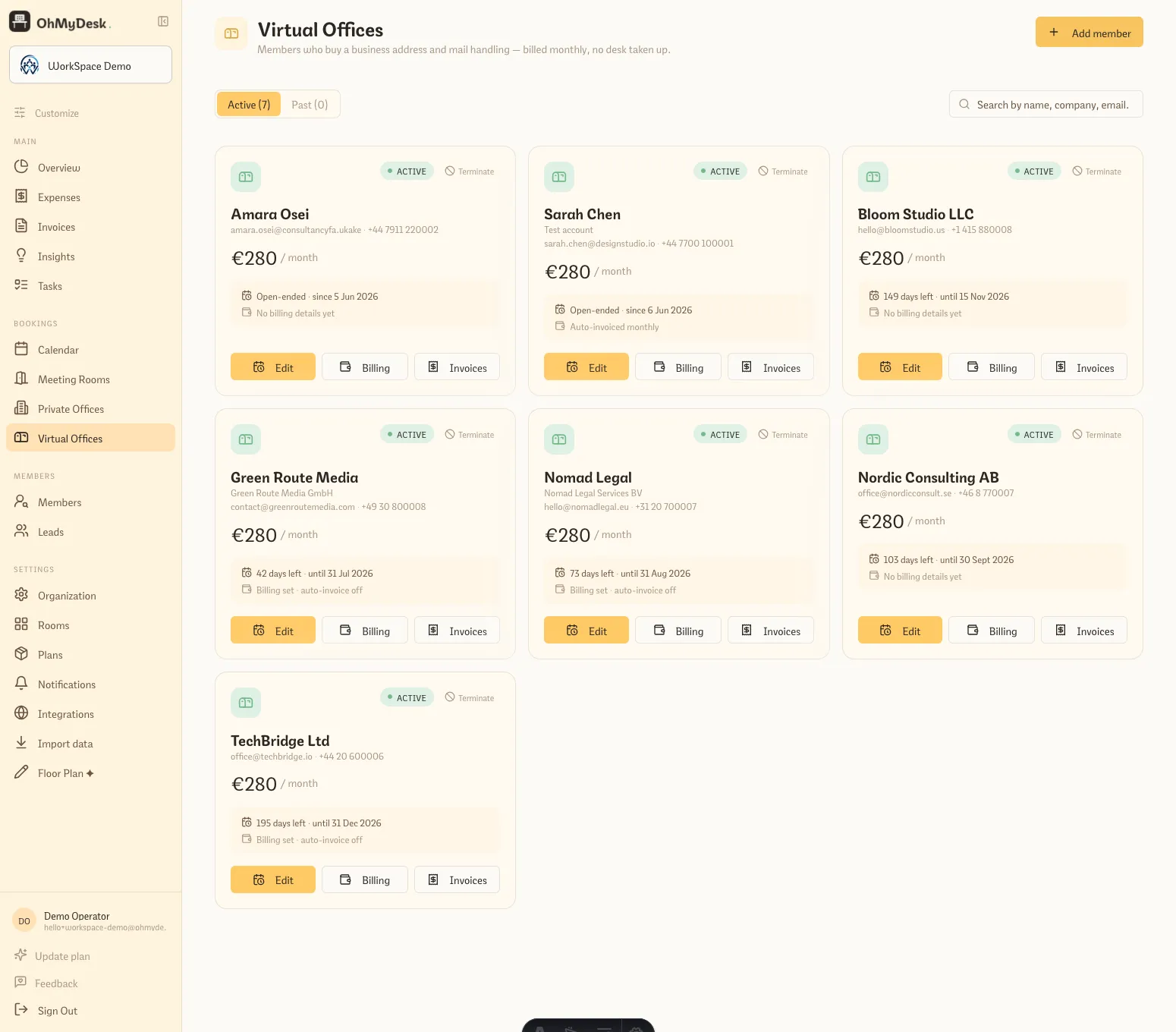 The dedicated Virtual Offices page — address-only clients live here as cards, not on the desk calendar, each with its price, term status, and billing in one place.
It’s a real plan type, with its own home. Turn on the Virtual Office plan on the Plans page and set a monthly price. Address-only clients live on a dedicated Virtual Offices page — right next to Private Offices — split into Active and Past, searchable by name, company, or email. They never appear on the desk calendar, because they’re not booking a desk.
Revenue counts; occupancy doesn’t. This is the part the spreadsheet and the desk-as-virtual-office hack both get wrong, and it’s the whole point. A virtual office member’s fee flows into your Overview and revenue figures, but they’re kept out of desk occupancy and the calendar’s demand signal. So your MRR reflects every cent you actually earn, and your “how full am I?” number still tells the truth.
Billing goes to the company. Auto-invoicing covers virtual offices, not just desks. With billing profiles, you can bill a member’s desk to them personally and their virtual office to their company — two correctly addressed invoices from one person — and partial months are prorated automatically on the invoice. Each plan can point at its own payer, so the monthly run drafts the right invoice to the right entity without you sorting it by hand.
Terms and renewals are tracked for you. Set a duration, or flag it open-ended in one tap for an ongoing contract. When a term lapses, the member is flagged for a one-step renewal instead of silently slipping off your books.
Each client can have their own price. Override the plan default for a specific company without changing it for everyone else.
And it imports. Switching from OfficeRnD? Map the virtual-office plan once in the migration wizard and matching members come across activated — company-billed invoices included, linked to the right member with their billing details intact. (Here’s the full migration walkthrough.)
One honest caveat: OhMyDesk runs the membership, billing, and revenue side of a virtual office. The physical mail — receiving it, logging it, forwarding it — is still your operation (a labelled shelf and a notebook get most small spaces surprisingly far). What you get back is the part that actually leaks money in a spreadsheet: who’s active, what they pay, who owes you, and when each term renews.
How to price a virtual office
The instinct is to anchor a virtual office to a fraction of a desk, and that instinct is right. A rough frame that works for most small spaces:
- Address only — your entry tier. Use of the address for mail and business identity, mail held for collection. This is the volume product.
- Address + mail forwarding — same, plus you post their mail on a schedule. Charge for the convenience and the postage.
- Address + a few meeting-room hours — bundle two or three hours a month. It nudges the price up and pulls virtual clients into the building, where some convert to desks.
Two pricing moves that matter more than the exact numbers:
Sell it annually where you can. Virtual office clients are low-touch and sticky — they’re not comparing seats every month. An annual prepay smooths your cash flow and cuts your churn to almost nothing. Limun does exactly this: buy a year of their virtual office and a month comes free — a small discount that locks in twelve months of near-passive revenue.
Don’t anchor to your cost — anchor to their alternative. A registered business address in a credible location is worth far more to a client than the few euros of mail handling it costs you. Price against what a “proper address” is worth to them, not against your overhead.
A note on compliance
Selling a registered or legal address is more regulated than selling a desk, and the rules vary by country. In several jurisdictions, providing a registered-office or business-address service triggers identity-verification (KYC) and anti-money-laundering obligations — you may need to verify and keep ID on every company that uses your address, and in some places register as a provider yourself. There are also mail-handling rules about what you can do with someone else’s post.
None of this is hard, but it’s worth thirty minutes with your local regulations (or your accountant) before you list the product. Keep ID on file for every virtual client and you’ll be ahead of most. This isn’t legal advice — just the thing operators wish they’d checked first.
Getting started in about 15 minutes
- Turn on the plan. Plans page → enable Virtual Office, set your standard monthly price. 2 minutes.
- Add your clients. On the Virtual Offices page, add each address-only member with their company and billing details — or convert existing contacts. Five minutes for a dozen.
- Set any custom prices. Override the default for clients on a negotiated rate. 2 minutes.
- Switch on auto-invoicing. Point each virtual office at its company so the monthly run bills the right payer. A few minutes.
That’s it. From there the revenue shows up in your Overview, your occupancy stays honest, and renewals flag themselves before they lapse.
The address is already yours. The demand is already there — every freelancer registering a company and every remote team that wants a credible location is a prospect. The only thing standing between you and that revenue is somewhere clean to put it.
Start free for 3 months — no card, no onboarding call — or see how virtual offices work first.